Overview
user_path is a normalized hierarchy for the caller, for example
/team/alpha or /team/alpha/service.
GoModel uses it to keep model access, workflows, budgets, usage, and audit data
scoped to the right team, tenant, service, or customer.
API keys
You can bind a user path to a managed API key in the admin dashboard:
API Keys -> Create API Key -> User Path
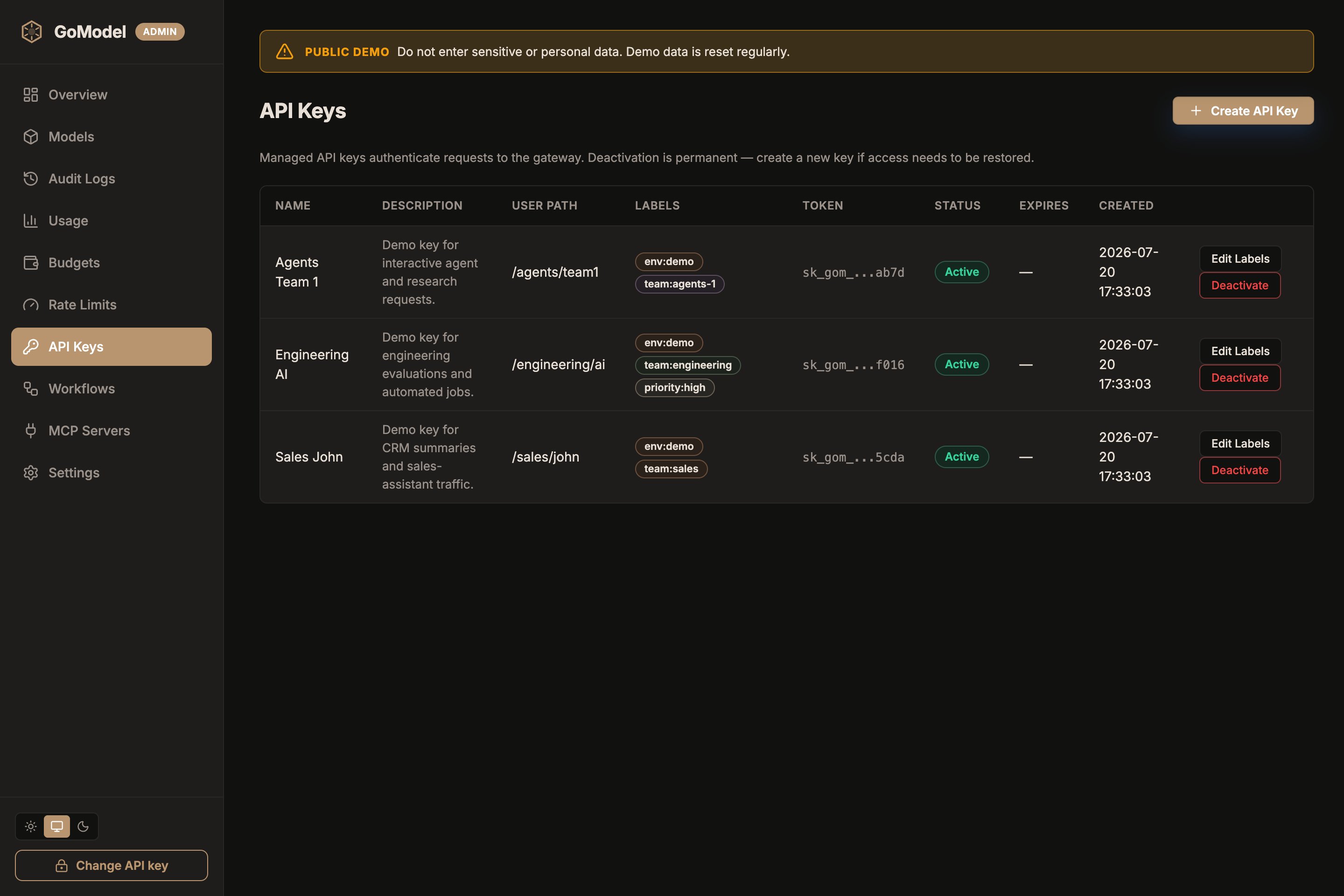 The API Keys page lists each key’s bound
 user_path alongside its
labels, so you can confirm which subtree a key resolves to at a glance.
When a request uses that key, GoModel treats the key’s user_path as the
effective user path for the request.
Clients can also send a user path directly:
The header name is configurable with USER_PATH_HEADER or
server.user_path_header in config.yaml. If unset, GoModel uses
X-GoModel-User-Path.
If the API key has its own user_path, the key wins. GoModel overwrites the
header value with the key-bound path before workflow matching, audit logging,
usage tracking, and model access checks run.
Model access
Model access policies are enabled by default. A policy is a virtual model with
no target; it can use user_paths to limit a selector to a subtree, or be
disabled to turn the selector off entirely. Selectors can target:
/ for all providers and models{provider_name}/ for one configured provider{provider_name}/{model} for one model on one provider- a model ID without a provider name
For example:
- selector:
openai/gpt-5
user_paths: ["/team/alpha"]
This allows /team/alpha and its descendants, such as /team/alpha/service.
Use Models -> New virtual model in the dashboard to manage these rules: leave
Target model empty to create an access policy on the Source selector.
See Virtual Models for redirects (aliases).
Exposed models
GET /v1/models uses the effective user_path too.
That means two API keys can see different model lists if their user paths have
different model access rules.
Workflows
Workflows can also include scope_user_path, so different teams or services can
use different budget, cache, audit, usage, guardrail, and failover settings.
You can combine user path with provider and model scope, for example:
/team/alphaopenai_primary + /team/alphaopenai_primary + gpt-5 + /team/alpha
See Workflows for the full matching order.
Budgets
Budgets are also scoped by user_path. A budget for /team/alpha applies to
/team/alpha and descendants such as /team/alpha/service, but not to sibling
paths such as /team-alpha.
See Budgets for spend limits and workflow enforcement.
Self-service usage and limits
Callers can check their own consumption without admin access:
The response covers the caller’s effective user path: recorded usage over a
date window, plus the status of every budget and rate limit rule gating that
path. See the Usage API for a full example and the
field reference.Last modified on August 1, 2026

