> ## Documentation Index
> Fetch the complete documentation index at: https://gomodel-feat-cache-economic-optimization.mintlify.site/llms.txt
> Use this file to discover all available pages before exploring further.
# Labelling
> Attach labels to requests from HTTP headers or API keys, and break down usage and audit logs by label.
## Overview
Labels tag every request for attribution: which team, feature, job, or
environment produced the traffic. A request can be labelled two ways, and both
can apply at once:
* **Tagging headers** — labels extracted from configured HTTP headers on each request.
* **API key labels** — labels bound to a managed API key, applied to every request authenticated with it.
Labels from both sources are merged and de-duplicated. They are recorded on
usage entries and audit log entries, and power the by-label usage breakdown in
the dashboard.
## API key labels
Assign labels when creating a key in the admin dashboard:
`API Keys -> Create API Key -> Labels`
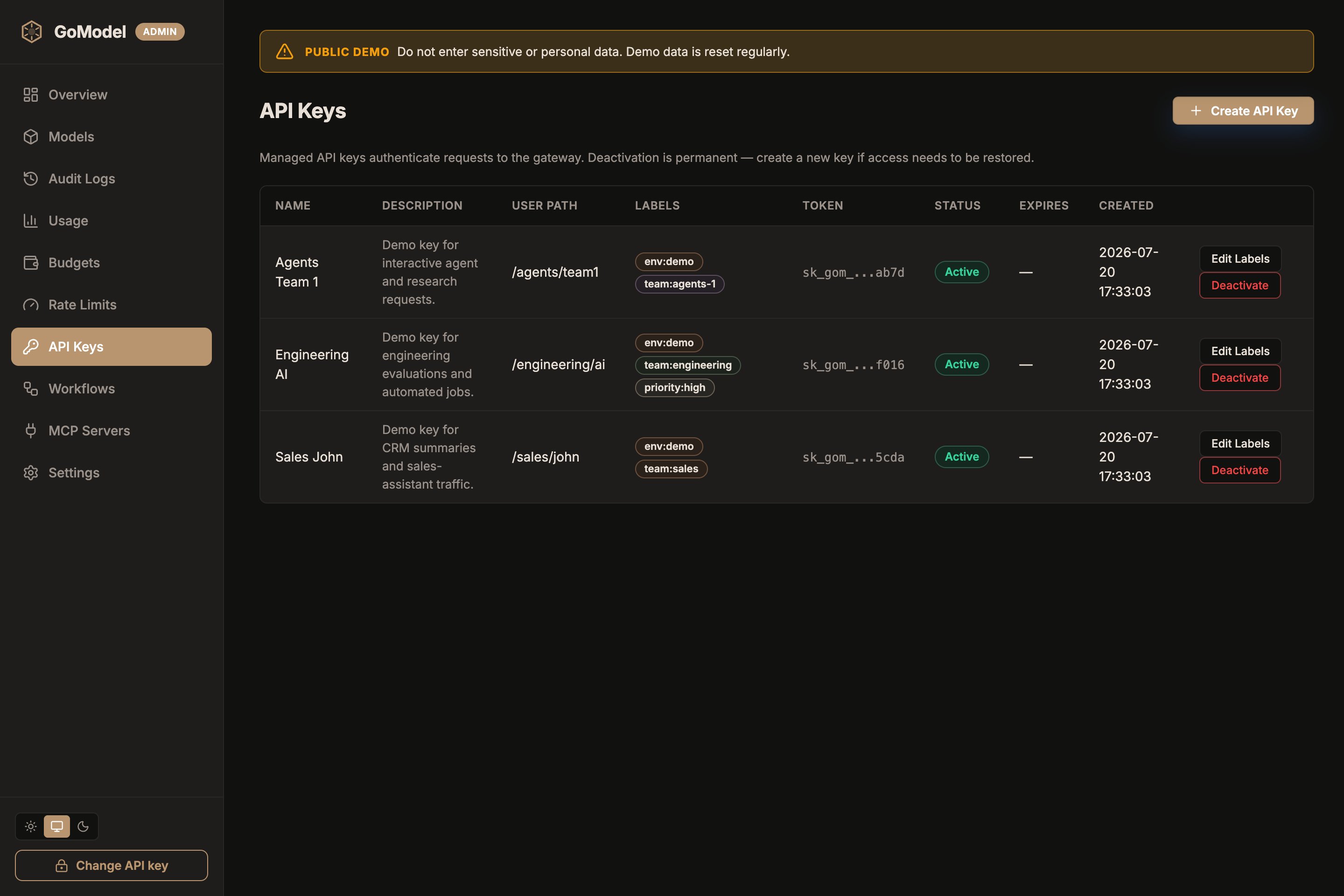 The **API Keys** page lists every managed key with its labels as chips next
to its user path, so you can see attribution at a glance without opening
each key. Click **Edit Labels** on a row to change them later.
Or via the admin API:
```bash theme={null}
curl -X POST http://localhost:8080/admin/auth-keys \
-H "Authorization: Bearer $GOMODEL_MASTER_KEY" \
-H "Content-Type: application/json" \
-d '{"name": "team-a-batch", "labels": ["team-a", "batch-jobs"]}'
```
Every request authenticated with that key carries those labels — no client
changes needed. This is the simplest way to attribute traffic per team or
service: issue each consumer its own labelled key.
Labels can be changed later without rotating the key, in the dashboard
(`API Keys -> Edit Labels`) or via the admin API:
```bash theme={null}
curl -X PUT http://localhost:8080/admin/auth-keys//labels \
-H "Authorization: Bearer $GOMODEL_MASTER_KEY" \
-H "Content-Type: application/json" \
-d '{"labels": ["team-a", "realtime"]}'
```
The new list replaces the old one; send `[]` to remove all labels. Changes
apply to new requests immediately on the instance that served the update and
within about a minute on other replicas (keys refresh from storage in the
background).
## Tagging headers
Tagging rules name headers whose values carry labels. Manage them in the
dashboard (`Settings -> Tagging based on headers`) or declare them as
infrastructure-as-code:
The **API Keys** page lists every managed key with its labels as chips next
to its user path, so you can see attribution at a glance without opening
each key. Click **Edit Labels** on a row to change them later.
Or via the admin API:
```bash theme={null}
curl -X POST http://localhost:8080/admin/auth-keys \
-H "Authorization: Bearer $GOMODEL_MASTER_KEY" \
-H "Content-Type: application/json" \
-d '{"name": "team-a-batch", "labels": ["team-a", "batch-jobs"]}'
```
Every request authenticated with that key carries those labels — no client
changes needed. This is the simplest way to attribute traffic per team or
service: issue each consumer its own labelled key.
Labels can be changed later without rotating the key, in the dashboard
(`API Keys -> Edit Labels`) or via the admin API:
```bash theme={null}
curl -X PUT http://localhost:8080/admin/auth-keys//labels \
-H "Authorization: Bearer $GOMODEL_MASTER_KEY" \
-H "Content-Type: application/json" \
-d '{"labels": ["team-a", "realtime"]}'
```
The new list replaces the old one; send `[]` to remove all labels. Changes
apply to new requests immediately on the instance that served the update and
within about a minute on other replicas (keys refresh from storage in the
background).
## Tagging headers
Tagging rules name headers whose values carry labels. Manage them in the
dashboard (`Settings -> Tagging based on headers`) or declare them as
infrastructure-as-code:
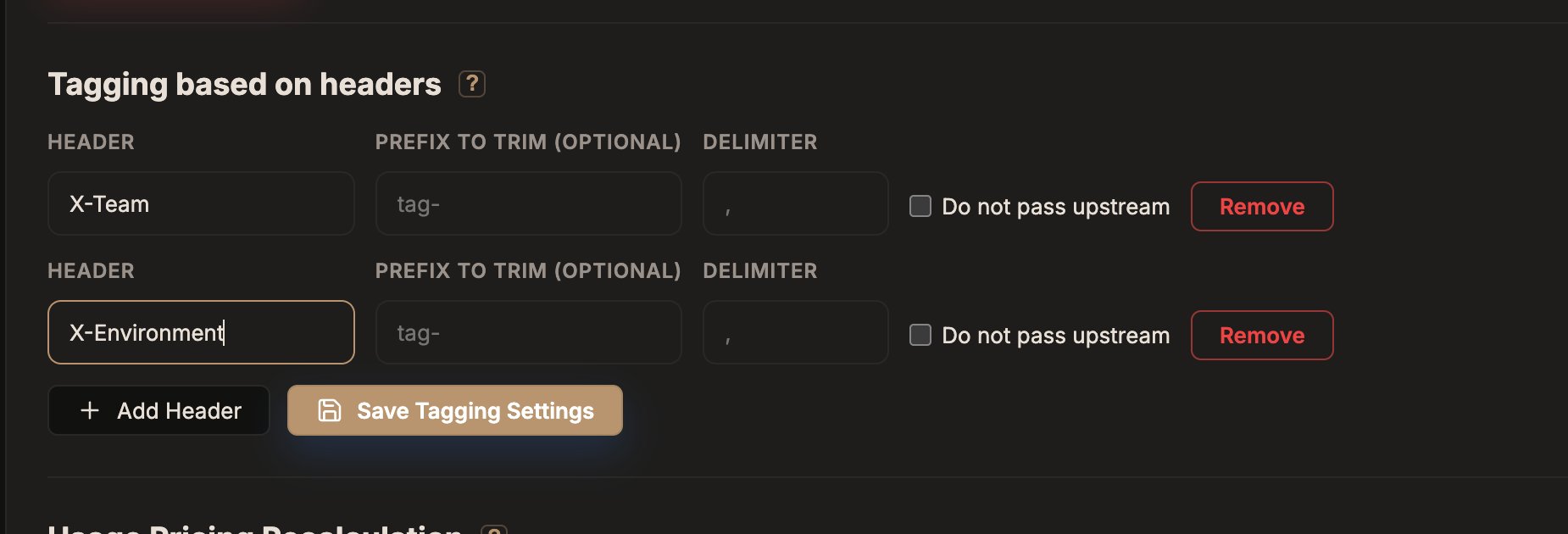 Click **Add Header**, name the header your clients will send (for example
`X-Team`), optionally set a prefix to trim and a delimiter, then **Save
Tagging Settings**. Check **Do not pass upstream** for headers that should be
stripped before the request reaches the provider.
```yaml config.yaml theme={null}
tagging:
headers:
- header: X-My-Tags
prefix: "tag-" # optional: "tag-alpha, beta" → labels "alpha", "beta"
- header: X-Internal-Routing
do_not_pass: true # stripped before forwarding to the provider
delimiter: ";" # default: ","
```
Or with environment variables (an env entry replaces the whole YAML entry with
the same header name; unset companion vars reset to defaults):
```bash theme={null}
TAGGING_HEADER_1=X-My-Tags
TAGGING_HEADER_1_PREFIX=tag- # optional, trimmed from each extracted label only
TAGGING_HEADER_1_DONOTPASS=true # optional, default false (headers are forwarded as-is)
TAGGING_HEADER_1_DELIMITER=";" # optional, default ","
```
A client then labels a request like this:
```http theme={null}
X-My-Tags: tag-alpha, beta
```
Rules declared in `config.yaml` or env are read-only in the dashboard.
Credential-bearing headers (`Authorization`, `Cookie`, API-key headers) are
rejected as tagging sources.
`do_not_pass` strips the header before forwarding on passthrough and realtime
routes; translated routes never forward client headers anyway.
## Where labels show up
* **Usage dashboard** — the usage page shows a by-label breakdown
(`GET /admin/usage/labels`). A request with several labels counts once under
each of them.
* **Request log** — label chips per request, filterable with the `label` query
param on `GET /admin/usage/log`.
* **Audit logs** — recorded under `data.labels` on each entry (audit logging is enabled
by default).
* **API keys page** — each key's labels are listed alongside its user path.
* **Budgets** — a budget can be scoped to a label, capping the spend of every
request carrying it. See [Budgets](/features/budgets).
## Defaults
Labelling is on by default and costs nothing until you configure a tagging
rule or create a labelled key. Requests without labels are tracked as before.
Click **Add Header**, name the header your clients will send (for example
`X-Team`), optionally set a prefix to trim and a delimiter, then **Save
Tagging Settings**. Check **Do not pass upstream** for headers that should be
stripped before the request reaches the provider.
```yaml config.yaml theme={null}
tagging:
headers:
- header: X-My-Tags
prefix: "tag-" # optional: "tag-alpha, beta" → labels "alpha", "beta"
- header: X-Internal-Routing
do_not_pass: true # stripped before forwarding to the provider
delimiter: ";" # default: ","
```
Or with environment variables (an env entry replaces the whole YAML entry with
the same header name; unset companion vars reset to defaults):
```bash theme={null}
TAGGING_HEADER_1=X-My-Tags
TAGGING_HEADER_1_PREFIX=tag- # optional, trimmed from each extracted label only
TAGGING_HEADER_1_DONOTPASS=true # optional, default false (headers are forwarded as-is)
TAGGING_HEADER_1_DELIMITER=";" # optional, default ","
```
A client then labels a request like this:
```http theme={null}
X-My-Tags: tag-alpha, beta
```
Rules declared in `config.yaml` or env are read-only in the dashboard.
Credential-bearing headers (`Authorization`, `Cookie`, API-key headers) are
rejected as tagging sources.
`do_not_pass` strips the header before forwarding on passthrough and realtime
routes; translated routes never forward client headers anyway.
## Where labels show up
* **Usage dashboard** — the usage page shows a by-label breakdown
(`GET /admin/usage/labels`). A request with several labels counts once under
each of them.
* **Request log** — label chips per request, filterable with the `label` query
param on `GET /admin/usage/log`.
* **Audit logs** — recorded under `data.labels` on each entry (audit logging is enabled
by default).
* **API keys page** — each key's labels are listed alongside its user path.
* **Budgets** — a budget can be scoped to a label, capping the spend of every
request carrying it. See [Budgets](/features/budgets).
## Defaults
Labelling is on by default and costs nothing until you configure a tagging
rule or create a labelled key. Requests without labels are tracked as before.