> ## Documentation Index
> Fetch the complete documentation index at: https://gomodel-feat-cache-economic-optimization.mintlify.site/llms.txt
> Use this file to discover all available pages before exploring further.
# Budgets
> Set spend limits per user path or request label and enforce them through workflow budget controls.
## Overview
Budgets let you set spend limits for a `user_path` subtree or a request
[label](/features/labelling). GoModel evaluates them from tracked usage cost
records and blocks matching requests when a limit has already been spent.
Every budget has a **scope** that names what it limits:
| Scope | Subject | Matches |
| ----------- | --------------------------- | --------------------------------- |
| `user_path` | A user path (`/team/alpha`) | That path and every path below it |
| `label` | A label (`Mobile-App-iOS`) | Every request carrying that label |
Use budgets when you want limits such as:
* `/team/alpha` can spend `$10` per day
* `/team/alpha` can spend `$50` per week
* `/` has a global monthly limit
* everything labelled `Mobile-App-iOS` can spend `$500` per month
Budget enforcement runs only when budgets are globally enabled and the active
workflow has Budget enabled. The Budget workflow control is enabled by default
when the global budget feature is on.
## Enable budgets
Budgets are enabled by default:
```env theme={null}
BUDGETS_ENABLED=true
```
Budgets depend on usage tracking because spend is calculated from usage cost
records:
```env theme={null}
USAGE_ENABLED=true
```
If usage tracking is disabled, GoModel starts with budget management disabled
and logs a warning.
## Create budgets
You can create budgets in the dashboard:
```text theme={null}
Budgets -> Create Budget
```
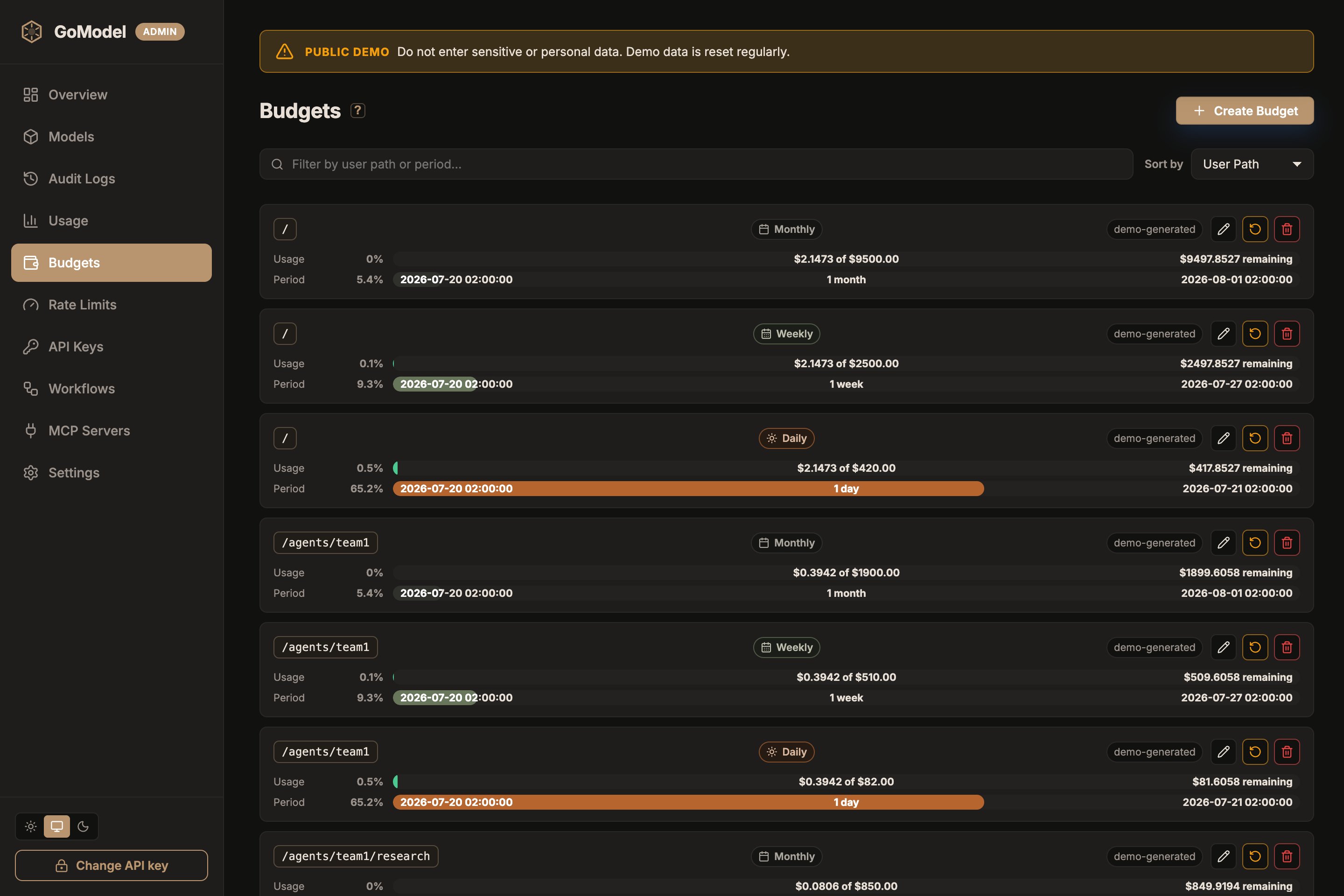 Set the **scope**, **subject** (a user path or a label), **period**, and
**amount** in the form. Each row on the Budgets page then shows spend as a
percentage of the limit, the amount spent versus the cap, and the remaining
balance for the current period. Label budgets carry a `label` chip next to the
period. Dashboard-created budgets are marked as `manual`. Budgets loaded from
YAML or environment variables are marked as `config`.
You can also seed budgets from YAML:
```yaml theme={null}
budgets:
enabled: true
user_paths:
- path: "/team/alpha"
limits:
- period: "daily"
amount: 10.00
- period: "weekly"
amount: 50.00
- path: "/"
limits:
- period: "monthly"
amount: 500.00
labels:
- label: "Mobile-App-iOS"
limits:
- period: "monthly"
amount: 500.00
```
Or use environment variables:
```env theme={null}
SET_BUDGET_TEAM__ALPHA="daily=10,weekly=50"
SET_BUDGET_="monthly=500"
```
The suffix after `SET_BUDGET_` becomes a user path. Use double underscores
(`__`) between path segments; single underscores remain part of a segment:
* `SET_BUDGET_TEAM__ALPHA` -> `/team/alpha`
* `SET_BUDGET_USER_123` -> `/user_123`
* `SET_BUDGET_` -> `/`
There is no escape for a literal double underscore inside a path segment. Use
YAML or the dashboard for paths that need a `__` segment value.
Label budgets have no environment-variable form. Labels are matched verbatim,
including their casing, and may contain characters that environment variable
names cannot express. Declare them under `budgets.labels` in YAML or create
them in the dashboard or admin API.
Supported standard periods are:
| Period | Seconds |
| --------- | --------- |
| `hourly` | `3600` |
| `daily` | `86400` |
| `weekly` | `604800` |
| `monthly` | `2592000` |
The Seconds column is the internal period identifier. Standard periods use the
configured reset-anchor logic; for example, `monthly` is stored as `2592000` but
resets on calendar month anchors and clamps the reset day to shorter months.
Only custom `period_seconds` values behave as fixed-second windows.
For custom windows, set `period_seconds` in YAML:
```yaml theme={null}
budgets:
user_paths:
- path: "/team/alpha"
limits:
- period_seconds: 7200
amount: 5.00
```
## How matching works
Budget paths apply to the configured path and its descendants:
* budget path `/team`
* request path `/team/app`
* result: budget applies
Sibling paths do not match:
* budget path `/team`
* request path `/team-alpha`
* result: budget does not apply
Label budgets match a label exactly, with no subtree or case folding:
* budget label `Mobile-App-iOS`
* request labels `["Mobile-App-iOS", "prod"]`
* result: budget applies
* budget label `Mobile-App-iOS`
* request labels `["mobile-app-ios"]`
* result: budget does not apply
Labels come from the tagging rules and from labels attached to the managed API
key that authenticated the request; see [Labelling](/features/labelling). A
request carrying several labels is charged against every matching label budget.
If multiple budgets match a request, GoModel checks all matching limits in one
lookup. The request is rejected if any matching limit is exhausted.
## Workflow enforcement
The active workflow controls whether budget checks run for a request.
In a workflow payload:
```json theme={null}
{
"schema_version": 1,
"features": {
"budget": true,
"cache": true,
"audit": true,
"usage": true,
"guardrails": true,
"failover": true
}
}
```
Use scoped workflows to turn budget enforcement on or off for a provider, model,
or `user_path` subtree. See [Workflows](/advanced/workflows) for matching
precedence.
Response cache hits can return before budget enforcement. If a cached response
exists, GoModel can serve it without spending additional provider cost.
## Reset windows
Budget reset anchors are configured in the dashboard under:
```text theme={null}
Settings -> Budget Resets
```
The reset settings are evaluated in UTC.
For monthly budgets, if the configured day does not exist in a month, the reset
runs on the last day of that month. For example, a monthly reset day of `31`
runs on April 30 and on February 28 or 29.
Editing a budget changes the limit but does not reset the current period. Use
the row-level Reset action to start a new period for one budget, or
`Settings -> Reset All Budgets` to reset all budgets.
## Admin API
Budget management is also available through the admin API:
```bash theme={null}
curl -H "Authorization: Bearer $GOMODEL_MASTER_KEY" \
http://localhost:8080/admin/budgets
```
Create or update a budget. A budget is identified by its `scope`, `subject`,
and period; `user_path` is accepted as a shorthand spelling of the subject for
user-path budgets:
```bash theme={null}
curl -X PUT http://localhost:8080/admin/budgets \
-H "Authorization: Bearer $GOMODEL_MASTER_KEY" \
-H "Content-Type: application/json" \
-d '{
"scope": "user_path",
"subject": "/team/alpha",
"budget_key": { "period": "daily" },
"amount": 10.00
}'
```
The same call for a label budget:
```bash theme={null}
curl -X PUT http://localhost:8080/admin/budgets \
-H "Authorization: Bearer $GOMODEL_MASTER_KEY" \
-H "Content-Type: application/json" \
-d '{
"scope": "label",
"subject": "Mobile-App-iOS",
"budget_key": { "period": "monthly" },
"amount": 500.00
}'
```
Delete a budget:
```bash theme={null}
curl -X DELETE http://localhost:8080/admin/budgets \
-H "Authorization: Bearer $GOMODEL_MASTER_KEY" \
-H "Content-Type: application/json" \
-d '{
"scope": "label",
"subject": "Mobile-App-iOS",
"budget_key": { "period": "monthly" }
}'
```
See [Admin Endpoints](/advanced/admin-endpoints) for the endpoint list.
Set the **scope**, **subject** (a user path or a label), **period**, and
**amount** in the form. Each row on the Budgets page then shows spend as a
percentage of the limit, the amount spent versus the cap, and the remaining
balance for the current period. Label budgets carry a `label` chip next to the
period. Dashboard-created budgets are marked as `manual`. Budgets loaded from
YAML or environment variables are marked as `config`.
You can also seed budgets from YAML:
```yaml theme={null}
budgets:
enabled: true
user_paths:
- path: "/team/alpha"
limits:
- period: "daily"
amount: 10.00
- period: "weekly"
amount: 50.00
- path: "/"
limits:
- period: "monthly"
amount: 500.00
labels:
- label: "Mobile-App-iOS"
limits:
- period: "monthly"
amount: 500.00
```
Or use environment variables:
```env theme={null}
SET_BUDGET_TEAM__ALPHA="daily=10,weekly=50"
SET_BUDGET_="monthly=500"
```
The suffix after `SET_BUDGET_` becomes a user path. Use double underscores
(`__`) between path segments; single underscores remain part of a segment:
* `SET_BUDGET_TEAM__ALPHA` -> `/team/alpha`
* `SET_BUDGET_USER_123` -> `/user_123`
* `SET_BUDGET_` -> `/`
There is no escape for a literal double underscore inside a path segment. Use
YAML or the dashboard for paths that need a `__` segment value.
Label budgets have no environment-variable form. Labels are matched verbatim,
including their casing, and may contain characters that environment variable
names cannot express. Declare them under `budgets.labels` in YAML or create
them in the dashboard or admin API.
Supported standard periods are:
| Period | Seconds |
| --------- | --------- |
| `hourly` | `3600` |
| `daily` | `86400` |
| `weekly` | `604800` |
| `monthly` | `2592000` |
The Seconds column is the internal period identifier. Standard periods use the
configured reset-anchor logic; for example, `monthly` is stored as `2592000` but
resets on calendar month anchors and clamps the reset day to shorter months.
Only custom `period_seconds` values behave as fixed-second windows.
For custom windows, set `period_seconds` in YAML:
```yaml theme={null}
budgets:
user_paths:
- path: "/team/alpha"
limits:
- period_seconds: 7200
amount: 5.00
```
## How matching works
Budget paths apply to the configured path and its descendants:
* budget path `/team`
* request path `/team/app`
* result: budget applies
Sibling paths do not match:
* budget path `/team`
* request path `/team-alpha`
* result: budget does not apply
Label budgets match a label exactly, with no subtree or case folding:
* budget label `Mobile-App-iOS`
* request labels `["Mobile-App-iOS", "prod"]`
* result: budget applies
* budget label `Mobile-App-iOS`
* request labels `["mobile-app-ios"]`
* result: budget does not apply
Labels come from the tagging rules and from labels attached to the managed API
key that authenticated the request; see [Labelling](/features/labelling). A
request carrying several labels is charged against every matching label budget.
If multiple budgets match a request, GoModel checks all matching limits in one
lookup. The request is rejected if any matching limit is exhausted.
## Workflow enforcement
The active workflow controls whether budget checks run for a request.
In a workflow payload:
```json theme={null}
{
"schema_version": 1,
"features": {
"budget": true,
"cache": true,
"audit": true,
"usage": true,
"guardrails": true,
"failover": true
}
}
```
Use scoped workflows to turn budget enforcement on or off for a provider, model,
or `user_path` subtree. See [Workflows](/advanced/workflows) for matching
precedence.
Response cache hits can return before budget enforcement. If a cached response
exists, GoModel can serve it without spending additional provider cost.
## Reset windows
Budget reset anchors are configured in the dashboard under:
```text theme={null}
Settings -> Budget Resets
```
The reset settings are evaluated in UTC.
For monthly budgets, if the configured day does not exist in a month, the reset
runs on the last day of that month. For example, a monthly reset day of `31`
runs on April 30 and on February 28 or 29.
Editing a budget changes the limit but does not reset the current period. Use
the row-level Reset action to start a new period for one budget, or
`Settings -> Reset All Budgets` to reset all budgets.
## Admin API
Budget management is also available through the admin API:
```bash theme={null}
curl -H "Authorization: Bearer $GOMODEL_MASTER_KEY" \
http://localhost:8080/admin/budgets
```
Create or update a budget. A budget is identified by its `scope`, `subject`,
and period; `user_path` is accepted as a shorthand spelling of the subject for
user-path budgets:
```bash theme={null}
curl -X PUT http://localhost:8080/admin/budgets \
-H "Authorization: Bearer $GOMODEL_MASTER_KEY" \
-H "Content-Type: application/json" \
-d '{
"scope": "user_path",
"subject": "/team/alpha",
"budget_key": { "period": "daily" },
"amount": 10.00
}'
```
The same call for a label budget:
```bash theme={null}
curl -X PUT http://localhost:8080/admin/budgets \
-H "Authorization: Bearer $GOMODEL_MASTER_KEY" \
-H "Content-Type: application/json" \
-d '{
"scope": "label",
"subject": "Mobile-App-iOS",
"budget_key": { "period": "monthly" },
"amount": 500.00
}'
```
Delete a budget:
```bash theme={null}
curl -X DELETE http://localhost:8080/admin/budgets \
-H "Authorization: Bearer $GOMODEL_MASTER_KEY" \
-H "Content-Type: application/json" \
-d '{
"scope": "label",
"subject": "Mobile-App-iOS",
"budget_key": { "period": "monthly" }
}'
```
See [Admin Endpoints](/advanced/admin-endpoints) for the endpoint list.